In 2026, the PC gaming ecosystem is more diverse and dynamic than ever before. The meteoric rise of tiered subscription services, competitive digital storefronts, and powerful cloud gaming infrastructure has fundamentally transformed how gamers access, purchase, and play their favorite titles. Choosing the perfect marketplace means carefully balancing complex factors like true game ownership, expanding library sizes, changing pricing models, and distinct hardware compatibility layers.
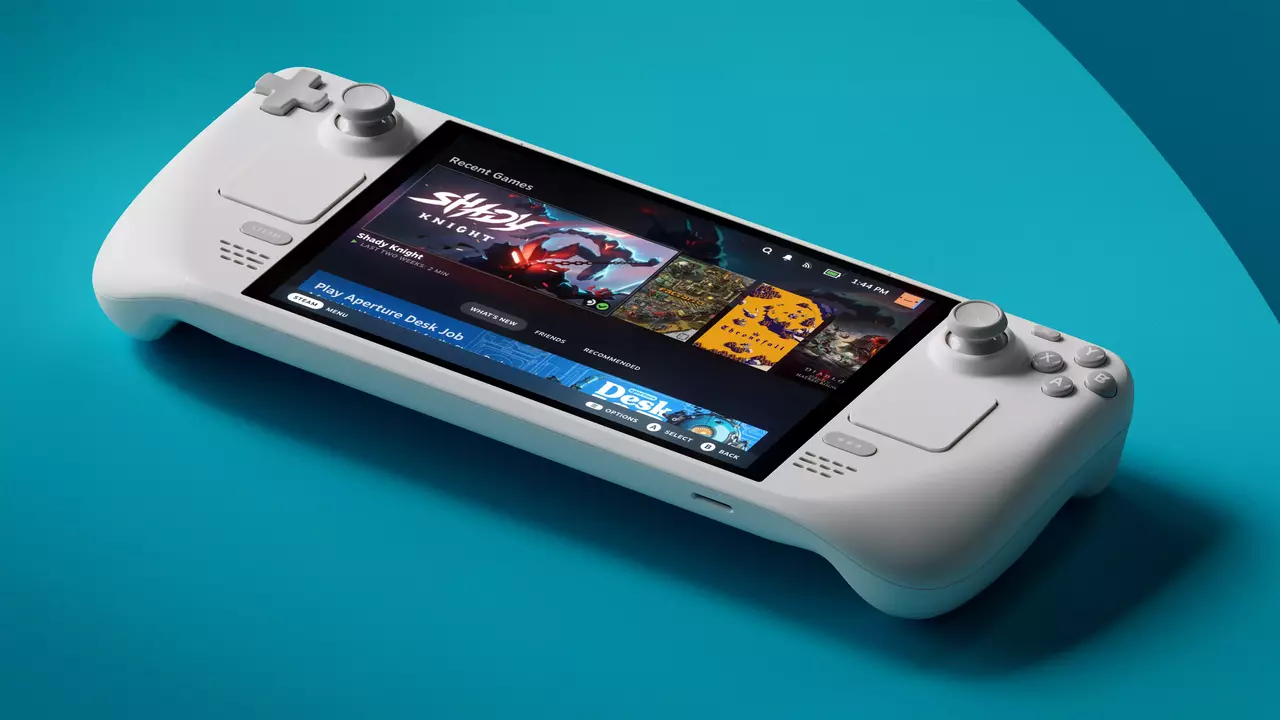
This comprehensive guide dives deep into the top PC-compatible platforms dominating the market in 2026, focusing explicitly on what each storefront represents, why it remains a critical player, and its defining structural features. We will also analyze Linux and Steam Deck compatibility, which serves as an essential benchmark for the rapidly growing community of open-source enthusiasts and portable handheld PC gamers. Lastly, we highlight exactly who each launcher is designed for, keeping a close eye on seasonal sales, flash promotions, and weekly giveaways, because maximizing your gaming budget is just as important as upgrading your graphics card.
EA Play
EA Play is the proprietary subscription ecosystem managed by Electronic Arts, which is designed to deliver immediate access to a massive vault of legacy and modern titles. This storefront aggregates iconic EA blockbuster franchises, including EA Sports FC, Battlefield, Madden NFL, and The Sims. Subscribing unlocks premium rewards, in-game cosmetics, and early access options that cater heavily to dedicated multiplayer communities.
Key Features
- Access to a curated vault containing over 80 high-profile EA titles and legacy releases;
- Generous 10-hour early trials for highly anticipated upcoming game launches;
- Permanent 10% member discounts on all digital purchases, including full games, expansion packs, and virtual currency packages.
Linux and Steam Deck Compatibility
Official native Linux client support does not exist for the EA app, meaning players must rely entirely on translation tools to access their libraries. While a massive portion of the underlying game catalog runs exceptionally well on the Steam Deck by utilizing the Proton compatibility layer, navigating the proprietary background launcher presents a significant technical bottleneck; specifically, the EA app is notorious within the open-source community for breaking unexpectedly after routine client updates, frequently trapping players in infinite login loops or throwing background process compilation errors inside Gaming Mode.
To bypass these launcher hurdles, players often have to force specific compatibility tools like Proton Experimental or use third-party script managers such as NonSteamLaunchers and Lutris to handle background dependencies and force update caching; furthermore, several of EA’s flagship competitive multiplayer titles remain completely unplayable on SteamOS due to strict, kernel-level anti-cheat software restrictions that refuse to execute within a Linux virtualization layer.
Best For
This service is ideal for dedicated fans of EA exclusives who want an affordable, predictable monthly or annual fee to experience major sports and action franchises without purchasing each individual entry at retail prices, making it a stellar option for variety players inside the EA catalog.
Epic Games Store
The Epic Games Store continues to shake up the PC distribution space through aggressive market tactics, massive publisher incentives, and user-acquisition campaigns. Known primarily for securing high-profile exclusive game launches and funding ambitious indie developers, the platform has cemented its place on millions of desktops through its famous free game giveaways that rotate every single week.
Key Features
- Highly aggressive exclusive launch windows for major AAA titles and community-driven multiplayer projects;
- Highly reliable weekly free game distributions that allow users to permanently expand their libraries without spending money;
- A highly competitive 88/12 revenue share model for developers, which actively encourages unique indie talent to prioritize the platform.
Linux and Steam Deck Compatibility
Epic does not offer a native Linux desktop client, which presents a small hurdle for handheld console owners. However, the gaming community has thoroughly solved this issue through the creation of the Heroic Games Launcher, an open-source application that perfectly manages your Epic library on Linux systems and handles Wine or Proton configurations seamlessly.
Best For
This storefront is best for budget-conscious players hunting for free games every week, alongside enthusiastic consumers who want to play major exclusive titles on day one or directly support independent studios with their purchases.
GOG (Good Old Games)
GOG (Good Old Games), which is operated under the parent company CD Projekt, remains the ultimate champion of user rights and digital preservation. The platform differentiates itself by strictly enforcing a completely DRM-free policy, meaning that when you buy a video game, you receive a standalone installer that requires no internet connection, no activation keys, and no proprietary background launchers to execute.
Key Features
- A strict, uncompromising DRM-free catalog that ensures total offline playability and absolute user ownership;
- Extensive master-craft optimization projects that make legendary classic PC titles run flawlessly on cutting-edge modern operating systems;
- The GOG Galaxy client, which acts as an optional, elegant library aggregator that pulls together friends lists and achievements from multiple separate platforms.
Linux and Steam Deck Compatibility
The platform boasts exceptional, native support for Linux-compatible titles, which makes it incredibly popular among open-source purists. On the Steam Deck, players can effortlessly install their offline installers or use community tools like Heroic to launch their cloud-synced GOG libraries on the go.
Best For
This marketplace is perfectly tailored for digital preservationists who refuse to accept restrictive digital rights management software, retro enthusiasts looking for optimized classic games, and open-system advocates who demand true ownership of their software purchases.
Humble Bundle
Humble Bundle revolutionized digital retail by introducing a highly flexible, pay-what-you-want structure that directly benefits global charitable organizations. Operating simultaneously as a standard digital store, a bundle distributor, and a curated monthly subscription service, it allows buyers to customize exactly where their money goes when acquiring vast packages of entertainment.
Key Features
- Incredible themed game bundles where a massive portion of the proceeds goes directly to verified non-profit organizations;
- The Humble Choice subscription, which awards members a curated package of permanent keep-forever games every single month;
- A robust storefront that issues standard activation keys, while allocating a customizable percentage of your checkout total toward good causes.
Linux and Steam Deck Compatibility
Because the vast majority of keys purchased on this site are redeemed directly onto the Steam platform, compatibility is top-tier. Native Linux versions are explicitly flagged on the store pages, and Windows keys take full advantage of the Proton layer inside the handheld operating system.
Best For
This platform is an incredible choice for philanthropic bargain hunters who want to build a sprawling digital collection rapidly, while simultaneously routing their financial support toward critical environmental, medical, and social charitable causes.
Instant Gaming
Instant Gaming operates as a highly streamlined, user-friendly digital key reseller, focusing entirely on cutting down retail overhead to provide steep, direct discounts on activation codes. It bypasses complex subscription mechanics and premium tiers, focusing purely on high-volume key distribution for an array of major platforms.
Key Features
- Significant, immediate price reductions on official game activation keys for all major platforms;
- An extensive, deeply cataloged inventory that covers everything from major new AAA releases to obscure simulator expansions;
- A highly transparent, minimalist transactional experience that completely avoids recurring monthly subscription fees.
Linux and Steam Deck Compatibility
The operational compatibility of your purchase rests entirely upon the specific launcher that the acquired key targets. Because most keys are destined for Steam, the games inherit the Steam Deck’s elite Proton framework, which guarantees an incredibly high success rate for portable playback.
Best For
This site is uniquely suited for frugal gamers who want deep, instantaneous discounts on individual titles without tying themselves down to complex ecosystem loops or monthly subscription commitments.
itch.io
For those who want to step off the beaten path, itch.io represents the absolute pinnacle of independent, experimental, and community-driven software development. It functions as an open, accessible publishing haven where anyone can host a digital project, leading to a highly diverse repository of artistic, retro, and avant-garde interactive media.
Key Features
- An unbeatably massive library of unique, experimental, and hyper-creative indie games that you cannot find anywhere else;
- Highly progressive, user-driven pay-what-you-want pricing mechanics that allow fans to tip developers directly;
- An incredibly friendly, open creator platform that hosts thousands of public game jams and developer community forums.
Linux and Steam Deck Compatibility
The platform features an official, fully optimized native Linux desktop application that handles downloads and updates flawlessly. This makes installing indie gems onto the Steam Deck’s desktop mode an incredibly smooth, native experience for users who enjoy portable indie gaming.
Best For
This application is the definitive destination for indie connoisseurs who love discovering strange, artistic, or experimental concepts, while directly funding independent creators without a corporate middleman.
Nvidia GeForce NOW
Nvidia GeForce NOW is a premium cloud-streaming powerhouse that sneaks onto this list despite not being a traditional store. Instead of forcing you to repurchase your favorite games, it lets you “cheat” hardware limitations by syncing directly with your existing digital storefronts to stream high-end PC titles onto almost any screen you own;
Key Features
- State-of-the-art, low-latency cloud streaming powered by cutting-edge Nvidia RTX graphics architecture;
- Direct integration with major existing storefronts, meaning you retain absolute ownership of your underlying library;
- Complete cross-device accessibility, which transforms low-spec laptops, mobile phones, and tablets into high-end gaming machines.
Linux and Steam Deck Compatibility
Nvidia already provide an official native Linux app installer, and the service is also fully accessible through standard Chromium-based web browsers. On the Steam Deck, this way allows players to stream graphically demanding AAA games seamlessly, which drastically preserves the handheld console’s battery life.
Best For
This utility is a total game-changer for players with low-end hardware or aging machines who want to experience ray-traced, ultra-settings graphics without investing thousands of dollars into a physical desktop tower.
Prime Gaming
Prime Gaming is a complimentary luxury benefit bundled directly into the standard Amazon Prime subscription layer. It provides consistent, rotating premium rewards, including permanent digital game keys, major in-game loot drops, and exclusive currency bonuses for some of the biggest live-service titles in the world.
Key Features
- A monthly drop of free PC games that are yours to keep permanently once claimed;
- Exclusive, highly valuable in-game cosmetics, weapon skins, and boost tokens for popular multiplayer ecosystems;
- A free monthly Twitch channel subscription, which allows you to support your favorite content creators at no additional cost.
Linux and Steam Deck Compatibility
The claimed games are distributed across a variety of launcher keys, including GOG, Epic Games Store, and the Amazon Games app. While running native Windows launchers can be tedious on Linux, the open-source community completely solves this issue through the Heroic Games Launcher, which natively connects to Epic, GOG, and Amazon to handle downloads, updates, and Proton configurations flawlessly on the Steam Deck.
Best For
This service is a fantastic passive bonus for existing Amazon Prime members who want to consistently pad their digital gaming libraries and unlock unique aesthetic rewards for their favorite online multiplayer titles.
Steam
Steam, which is developed and maintained by Valve, remains the undisputed titan and gold standard of the worldwide PC gaming community. It is far more than a simple digital storefront, acting as a massive, all-in-one social ecosystem, a modding paradise, a hardware optimization developer, and a highly secure marketplace that hosts tens of thousands of active titles.
Key Features
- An unbeatably massive, ever-expanding digital software catalog that ranges from solo indie passion projects to the largest AAA blockbusters;
- The legendary Steam Workshop, which allows users to download, install, and manage community-made mods with a single click;
- Incredibly deep community features, including detailed user reviews, trading card economies, achievement tracking, and robust integrated forums.
Linux and Steam Deck Compatibility
Valve’s long-term investment in open-source gaming has yielded flawless, industry-defining native Linux support. Through their proprietary Proton compatibility tool, Windows-exclusive games run beautifully on Linux systems out of the box, serving as the core foundation for SteamOS on Valve devices.
Remarkably, certain Windows-exclusive games actually achieve superior performance and higher frame rates when translated through Proton than they do running natively on Windows itself, thanks to a lower OS resource overhead and hyper-optimized Vulkan graphics translations. Furthermore, Proton provides vastly superior backwards compatibility for aging legacy titles. While modern Windows installations routinely drop support for historical software hooks and older DirectX APIs, Steam’s compatibility layers act as an automated preservation tool, allowing classic PC games to boot up on Linux effortlessly without the manual configuration or community modding files typically mandatory on modern Windows.
Best For
This platform is the definitive option for every single PC gamer, offering the most comprehensive, feature-rich, and stable environment available for collecting, modding, and playing digital interactive media.
Ubisoft+
Ubisoft+ is a premium, publisher-centric subscription service designed to give immediate, unrestricted access to the entire portfolio of Ubisoft’s AAA intellectual properties. This includes massive, sprawling historical and tactical franchises like Assassin’s Creed, Far Cry, Tom Clancy’s Rainbow Six, and Watch Dogs.
Key Features
- Instant access to the premium, ultimate editions of Ubisoft’s brand-new day-one releases;
- An extensive back-catalog full of classic franchises, expansions, and comprehensive downloadable content packs;
- Monthly in-game rewards, unique cosmetic items, and progressive booster packs for ongoing live-service titles.
Linux and Steam Deck Compatibility
There is no official native Linux distribution for the Ubisoft Connect client, meaning running these titles requires translation layers. While a massive portion of Ubisoft’s single-player catalog runs beautifully on the Steam Deck via custom Proton tweaks, the proprietary desktop launcher remains a source of constant frustration; specifically, Ubisoft Connect updates frequently break compatibility overnight, requiring players to constantly clear cache dependencies, modify MTU network configurations in desktop mode to bypass “connection lost” errors, or use community scripts like NonSteamLaunchers to force the launcher to install correctly.
Furthermore, the multiplayer ecosystem is heavily fractured by strict digital security policies; while Ubisoft has enabled Easy Anti-Cheat (EAC) compatibility under Proton for specific cooperative games like The Division 2, competitive flagship titles like Tom Clancy’s Rainbow Six Siege remain entirely locked out of Linux and SteamOS because the publisher refuses to toggle the server-side anti-cheat flags required to allow Linux players onto secure public matchmaking servers.
Best For
This platform is an incredible, cost-effective match for die-hard Ubisoft franchise superfans who intend to play through every massive open-world release on launch day, along with their associated premium expansions, without paying premium retail prices for each game.
Xbox Game Pass for PC
Xbox Game Pass for PC, which is frequently referred to as PC Game Pass, is widely considered the absolute best value proposition in modern interactive entertainment. Microsoft’s massive subscription service grants users access to a highly dynamic, rotating vault of hundreds of high-quality titles, completely removing the financial friction of trying out new genres.
Key Features
- A massive, constantly evolving rotating catalog that features hundreds of titles spanning every conceivable genre;
- Guaranteed day-one access to every single first-party release from Xbox Game Studios, Bethesda, and Activision Blizzard;
- Seamless cloud save synchronization, integrated achievements, and direct cross-play functionality with the broader Xbox console ecosystem.
Linux and Steam Deck Compatibility
Because the service relies heavily on the Universal Windows Platform (UWP) and the native Windows Store framework, there is absolutely no local Linux software client available for downloading games directly; consequently, players who want to install PC Game Pass titles locally on a Steam Deck are forced to go through the old school process of dual-booting the device with a dedicated Windows installation.
Fortunately, users can completely bypass these operating system constraints by accessing the comprehensive Xbox Cloud Gaming tier directly through modern web browsers; specifically, Microsoft officially supports setting up Microsoft Edge or Google Chrome as a non-Steam application shortcut within SteamOS, which automatically opens the cloud interface in fullscreen Gaming Mode with full controller driver mapping. This setup allows Steam Deck owners to stream heavy hits like Halo or Forza instantly over a stable internet connection, shifting the entire graphical rendering workload to external servers and resulting in exceptionally minimal local battery draw compared to running demanding AAA titles natively.
Best For
This subscription is absolutely perfect for variety gamers who love bouncing between different titles every single month, along with fans of Microsoft’s major internal studios who want premium day-one access at a highly predictable monthly cost.
Final Thoughts
Navigating the sprawling PC-compatible gaming landscape in 2026 ultimately boils down to analyzing your individual playstyle preferences, your physical hardware configuration, and your personal philosophy surrounding digital software ownership. If you value absolute control over your purchases without online connectivity mandates, GOG remains an unmatched oasis, while those looking to maximize their monthly entertainment budget will find immense, undeniable value in multi-game subscription vaults like Xbox Game Pass for PC.
The long-term health and structural evolution of Linux and Steam Deck compatibility has grown from a niche enthusiast project into a primary driving force of modern PC software design. Market leaders like Steam have set an incredibly high bar for native integration, pushing community developers to craft ingenious alternative launchers for platforms like Epic Games Store, GOG, and Prime Gaming to keep portable handheld hardware competitive. Paying close attention to how these compatibility frameworks adapt ensures that your digital library remains highly accessible, whether you are sitting at a high-end desktop tower or gaming on an airplane.
Furthermore, this operating system shift has fundamentally reshaped the consumer optimization landscape; choice of platform is no longer just about pricing tiers, but about tracking which ecosystems actively support open-source translation layers. With Linux gaming market share reaching unprecedented milestones in 2026 and major architectural breakthroughs like Proton frequently delivering better legacy performance than modern Windows, cross-platform stability has become a massive selling point; consequently, developers are increasingly forced to account for handheld SteamOS optimization from day one, which directly dilutes the historic Windows monopoly on PC gaming.
Ultimately, the inherent beauty of the PC ecosystem lies in its complete lack of institutional monopolies, giving you the freedom to shop around for the best deals. By tracking weekly promotional giveaways on the Epic Games Store, capitalizing on charity-driven bundles through Humble Bundle, or sourcing immediate key discounts via Instant Gaming, you can cultivate a massive, world-class library tailored precisely to your technological needs and financial goals.
Sources: